
2.36.24
Templates and e-mail
A template is a text with places for the run's values: the body of an e-mail, a letter, a message for a chat. You write it once, on the process's Templates tab, and an input that takes a text can use it. When the run reaches the node, Spider fills the run's values in, and the input gets the finished text. This chapter explains how to write templates, and how a process sends e-mail with them.
A process's templates
A process's templates are on the Templates tab of the designer, beside Variables and Forms. They belong to the whole process: its sub-processes use the same ones. Add template on the ribbon adds one.
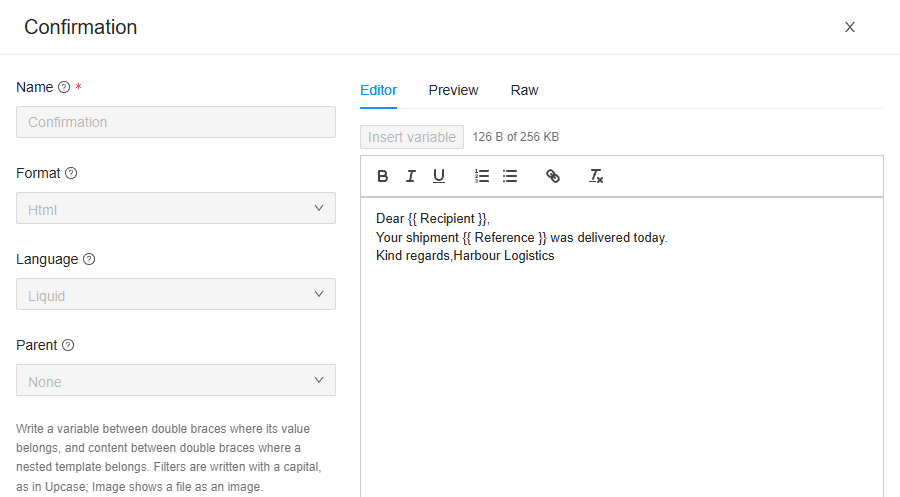
- Name: The name this template is known by within the process, unique in it. Letters, digits, underscores, hyphens and spaces.
- Format: Text or Html: plain text, or a text with layout, such as an e-mail's body.
- Language: Liquid, the language the placeholders are written in. It is the only one.
- Parent: The template this one is rendered inside, or None. See Nesting templates.
- The contents, in an editor with three tabs:
- Editor: write the text. An Html template is written as in a word processor, with headings, bold, lists, links and images; a Text template as plain text. Insert variable puts in a placeholder for a variable; typing
{{offers the variables too. - Preview: the text as a run would fill it in, with each variable's default value, or its name in ‹ › when it has none.
- Raw: the HTML itself, for an Html template.
- Editor: write the text. An Html template is written as in a word processor, with headings, bold, lists, links and images; a Text template as plain text. Insert variable puts in a placeholder for a variable; typing
A template holds 256 KB at most, and a process's templates 4 MB together. An image pasted into the editor is stored as a file of the organization, not in the template; the editor refuses one pasted as data: content.
Placeholders
A placeholder is a variable's name between double braces: {{ Recipient }} is replaced by the value of the variable Recipient. So Dear {{ Recipient }}, becomes Dear Northwind Foods,.
| Write | For |
|---|---|
{{ Recipient }} | A variable. |
{{ Shipment.Reference }} | A property of a variable. |
{{ ProcessRun.Reference }} | The run's reference; also ProcessRun.Name, ProcessRun.Environment.Name and ProcessRun.StartedBy.Name. |
{{ Item.Recipient }} | The loop's item, on a node that repeats for each item. |
A template can read the variables the node it is used in can read: see Variables and parameters. Names are matched ignoring case. A name no variable has is written as it is, in ‹ ›, such as ‹Recipeint›, into the text the run sends, so check the Preview for those. The designer's check warns about them too.
Liquid
Templates are written in Liquid, which can do more than fill in values:
| Write | Does |
|---|---|
{% if Amount > 1000 %}…{% endif %} | A part only some texts get. {% else %} gives the others another. |
{% for Line in Order.Lines %}{{ Line.Description }}{% endfor %} | A part repeated for each item of a list, such as a table row per order line. |
{{ Recipient | Upcase }} | A filter changes a value: NORTHWIND FOODS. |
{{ SentAt | Date: "dd-MM-yyyy" }} | A date in a format of your own. |
{{ Comment | Escape }} | A text as text, also when it holds < or &. See below. |
{{ Photo | Image }} | A file of the run, shown as an image, in an Html template. |
Filters are written with a capital, as in Upcase, Downcase, Truncate, Date and Escape, unlike in Liquid's own documentation. A filter in small letters does nothing at all.
An Html template writes a variable's value as it is, as HTML: a comment that holds <b> makes the rest bold. Where a value comes from outside, such as something a customer typed into a webhook or a form, write it with | Escape.
A template must be done within 2 seconds, and a loop in it runs 10,000 times at most.
Nesting templates
A template can be put inside another, its Parent: the parent's text, with this template's in the place where the parent writes {{ content }}. Use it for what every e-mail of the process shares, such as a heading and a signature:
html
<p><img src="…logo…"></p>
{{ content }}
<p>Kind regards,<br>Harbour Logistics</p>
A parent can have a parent of its own, 16 deep at most. An input that uses the child gets the whole: the parent, with the child inside it. The name content is kept for this: no variable can have it.
Using a template
An input that takes one text can be filled in with a template: pick Template on its button, and the template by name. See Inputs. A module can ask for a format, such as the HTML body of an e-mail: the list then holds only the templates of that format (No Html templates when there are none). A sub-process's parameters and a start process run's parameters can take a template too.
The template is filled in by Spider, when the run reaches the node, before the activity is handed to an agent. When it can't be, such as a template that was deleted, or a placeholder Liquid can't read, the node fails before it starts: its log says Input 'body': the value could not be resolved, with the reason.
Sending an e-mail
Spider sends e-mail with the Send e-mail activity of the Graph.Email integration module, through a mailbox of Microsoft 365. Send delivery confirmation is an example:

| Input | Takes |
|---|---|
| Connection | The mailbox to send from: a connection of the organization. |
| To, Cc | The recipients of the e-mail. Lists of EmailAddress. To needs at least one. |
| Subject | The subject of the e-mail. A text, often an expression, such as concat("Shipment ", {Reference}, " delivered"). |
| Body | The body of the e-mail, as HTML. Usually an Html template. |
| Attachments | Files of the run to attach, such as a PDF it made. |
| Importance | How important the e-mail is marked. |
Addresses
An address is of the built-in type EmailAddress, with an Address (anna.jansen@example.com), an optional Name (Anna Jansen) and a Display form. To and Cc take a list of them, so a text such as {CustomerEmail} doesn't fit them: Expression does not return 'EmailAddress'. Give them one of these:
- A list variable of type EmailAddress, such as the parameter To of Send delivery confirmation, which whoever starts the run fills in: Address and Name for each recipient. Pick it as a Variable.
- A mapping that builds the list from what the run has: pick Mapping, tick A list, and map Address (and Name) from your variables, with For each over a list of e-mail addresses. See Mapping.
- The addresses of another e-mail, such as
{Email.Cc}of an e-mail a trigger read, to copy the same people in.
An e-mail a process reads, or sends, is of the built-in type Email, with its From, To, Subject, HtmlBody, Attachments and more: see Types.
The organization's e-mail templates
The E-mail Templates page in the main menu holds e-mail templates and layouts that are the organization's, not a process's: see E-mail Templates. They are written the same way, but their placeholders read {{ variables.Reference }}. The activities in this guide don't use them: a process's e-mails are written in the process's own templates.
What the check says
| Message | Severity | What to do |
|---|---|---|
| The template 'Confirmation' can't be rendered: … | Error | The Liquid is wrong, such as an {% if %} without {% endif %}: the rest says where. |
| The template 'Confirmation' reads 'Recipeint', which no variable of this process is named. | Warning | Correct the name, or add the variable. |
| More than one template is named 'Confirmation'; a template name is unique across the process. | Error | Rename one. |
| The template 'Confirmation' is nested in a template that no longer exists. | Error | Pick another Parent, or None. |
| The template 'Confirmation' is nested in a chain that returns to itself. | Error | A template can't be its own parent's parent: pick another Parent. |
| The template 'Confirmation' holds …, over the 256 KB one template may hold. | Error | Make it shorter, or move images out of it. |
| The input 'Body' is bound to a template that does not exist. | Error | The template was deleted: pick another one. |
| The input 'Body' expects a Html template, but 'Confirmation' is Text. | Error | Pick an Html template, or change its Format. |
| The input 'Body' is bound to template 'Confirmation', which reads Item, but the node does not loop, so Item renders empty. | Warning | Read another variable, or let the node loop. |
Related chapters
- Inputs: filling an input in with a template.
- Activities and connections: the mailbox an e-mail is sent from.
- Forms and user tasks: a form's texts are written the same way.