
2.36.24
Outputs
An output is a result a node gives back: the number Increase Counter counted to, the e-mail Send e-mail sent, the value Map built. This chapter explains where those results go.
Where a result goes
A node's results go into variables. The Outputs tab of an activity's settings has a row for each result the activity gives back, with its name and a list to pick a variable from (Select a variable). An activity that gives nothing back, such as WriteLine, has no Outputs tab.
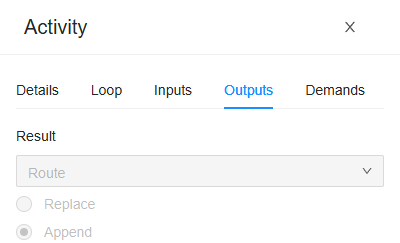
- Pick the variable the result goes into. For a variable of a complex type, you can pick one of its properties instead, such as Delivery › Weight: the result then goes into that property, and the rest of the variable stays as it is.
- Only variables of the result's type can be picked. A result that can be anything, such as the Result of Set Variable, can go into any variable.
- Only the node's own variables can be picked: those of the process or sub-process the node is in, not those of the process around it. A sub-process hands its values back through its own outputs: see below.
- A result can be left out. Leave its row empty, or clear it with its ×, when you don't need it.
- The list has no Add. Add the variable on the Variables tab first: see Variables and parameters.
When the activity has run, Spider checks each result against its type, and then writes it into its variable. A result the activity didn't give (it is empty) leaves the variable as it was.
Replace or Append
When the variable you pick is a list, two buttons appear under it:
- Replace (the default): the result becomes the variable's new value. A single value becomes a list of one.
- Append: the result is added to the end of the list. A list adds each of its items.
Add it to the route above appends the delivery it is given to Route, the list of every stop planned so far. Collecting results in a list this way is what Append is for.
In a loop
A node that repeats for each item of a list (its Loop tab) gives back a result in every round. So its results can go only into a list, and always Append: the buttons are not shown. When the loop starts, the list is emptied once; every round then adds its result, so afterwards the list holds one result for each item, in order.
The list a loop goes through can't be the list its results go into: the check says The output 'Result' writes variable 'Deliveries', which is the array the loop iterates.
A sub-process's outputs
A sub-process's variables are its own: nothing outside it can read them. Its Outputs tab hands them back: it has a row for each variable of the sub-process, and you pick the variable of the process around it that gets its value when the sub-process ends. The two must have the same type. The rows you leave empty hand nothing back.
When the sub-process repeats for each item, its outputs go into lists, appended round by round, as with an activity.
A start process run's output
A start process run gives back one result: Started run, The key of the started run, as text. Put it in a text variable when the process needs to refer to that run later. The new run's own variables stay in that run: the run that started it doesn't wait for it, and gets none of its values.
Files and e-mails
A variable that holds a file or an e-mail takes a result as a whole. A result written into one of its properties, such as Email › Subject, is ignored, and the check warns: … which a File variable does not support. Map the output to the whole variable. The output is ignored.
What the check says
| Message | What to do |
|---|---|
| The output 'Result' writes a variable that is not declared in this scope. The output is ignored. | The variable was deleted, or belongs to another process: pick another one. |
| The output 'Result' is a Delivery value, but variable 'Weight' is declared as Decimal. | For a sub-process or a start process run: pick a variable of the same type. |
| The output 'Result' writes variable 'Total', which is not an array; a loop appends one value per iteration. | A looping node needs a list: pick one, or make the variable a list (This variable is an array). |
Related chapters
- Inputs: the values that go into a node.
- Variables and parameters: the variables results go into.
- Process run: what a run's variables hold.